Saturday, October 27, 2012

SAP ALE IDocs interview questions and answers Part 1


ALE IDocs in SAP


ALE IDocs in SAP is a lot about configuration and a lot about Tcodes . So if you have worked on at least one end to end scenario in ALE IDocs in SAP , you probably already have answers to a lot of questions.

Cheers!!

But if you haven't , make sure you do this exercise. There are plenty of step by step guides to ALE IDocs available on the internet . Make sure you read one understand it all the way . Sending IDoc from client 800 to say client 810 on the same server is easy . If possible ,Try an exercise in which you send an IDoc from one system to another system. 


Lets get started . Hope you get some value in these pages :)

Question 1:  What is ALE ?
ALE stands for Application Link Enabling. As it's name indicates , it links two systems.
ALE is a technology that can enable exchange of data between two different Systems ( Sap - Sap OR Sap - Non Sap). ALE technology enables distributed yet integrated installation of SAP systems.
ALE architecture comprises of 3 layers : 

Application layer refers to the application data ( SD , MM , FI or data for any SAP application ) . In this layer the data is collected to be distributed and then sent to the distribution layer.

Distribution layer determines to whom should the data generated by the application layer has to be distributed i.e. it is in the distribution layer that the recipient is determined , the data is formatted or filtered and then an actual is created.

Communication layer takes the responsibility of delivering the Idoc to the receiving system and communicates to the receiving system via tRFC , File ports , FTP or TCP/IP etc.

ALE uses IDoc as a vehicle to transfer data between two systems.


Question 2:  What is EDI ?
EDI stands for Electronic Data Interchange. It refers  to the electronic exchange of business data in a structured format between two systems. The EDI subsystem generally converts the Idoc data into one of the many EDI formats and generates an EDI file in an X12 format. The middleware then translates the X12 file to an IDOC format and the IDOC is sent to the SAP system.


Question 3:  What is an Idoc?   What is IDoc Type?   What is an IDoc Extension ?
An IDoc (Intermediate document) is a vehicle that is used to transfer data from one system to another.
IDoc is not a technology of some sort , but it is just a container that holds data . 
It holds data in a structured format i.e. in the Fields of the Segments.

IDoc Type vs. IDoc: 
An IDoc Type is nothing but a collection of one or more structures defined in a system with specific fields. It does not hold Data.
However, an IDoc is something that holds the values in the fields of the structure defined by IDOC type.

The transaction code to view an IDoc type (Basic and extension) is WE30.
Examples: ORDERS04, DEBMAS04, MATMAS04, CREMAS04.
These are all SAP standard Basic IDoc Types.

You can even have an IDoc extension in which you can use the existing Basic IDoc type and add extra segments and fields to it. Usually we extend an IDoc when the standard SAP IDoc type is not able to cater to the business process.  


Question 4:  What are the types of records in SAP ALE Idocs and where is this information stored ?
There are three types of records in SAP ALE Idocs:
Control Records: Control record information for an IDoc is stored in standard table EDIDC.
Data Records:     Control record information for an IDoc is stored in standard table EDIDD.
Status Records:   Control record information for an IDoc is stored in standard table EDIDS.


Question 5:  What is an Idoc status?  What are the different types of Idoc statuses that you know ?
When an IDoc is sent from one system to another , it goes through variuos stages.The IDoc status indicates the stage that the Idoc in currently in.
There about 75 IDoc statuses.There is no way you can remember those all .
Don't even try to ! You will probably remember only those on which you have worked .

But here are a few that you should know:
0-49 indicates an Outbound IDoc and 50-75 as Inbound IDoc. 

01  IDoc generated
02  Error passing data to port
03  Data passed to port OK

51  Application document not posted
52  Application document not fully posted
53  Application document posted


Question 6:  What is a Port ? What are the types of Ports ?
A port is a communication channel through which Messages can be sent or received in SAP .
The sender and the receiver both specify the port through which they will communicate.

The common port types are the TRFC Port and the File Port.
If both sender and receiver mention TRFC ports, data is exchanged via RFC connections.
If however , a file port is mentioned , the IDOC is written in a flat file at the specified location at the sender system.Then a FTP transfer should be done from that location to the receiver system or a Middleware that will send the file to the receiver system.

The transaction to maintain ports is WE21.


Question 7:  What is a Message type and Idoc Type ? What is the difference between Message type and an IDoc type?
A Message type and an IDoc type are closely related . In fact, you will find that a Message type is always associated with an IDoc type.Whereas an IDoc type is a detailed version with all the segments and fields , a Message type is used just to specify the kind of information that a system can send or receive to or from another system.

So If system SAP1 has a Partner Profile where it specifies MATMAS as an outbound message type , it just means that SAP1 can send material master data to say system SAP2.

If system SAP1 has a Partner Profile where it specifies MATMAS as an inbound message type , it just means that SAP1 can receive material master data from say system SAP2.

What all fields can be sent and received will be specified in the IDoc type.
Some other message types: DEBMAS( Customers), CREMAS(Vendors) belong to the Master data.

The link between a message Type and an IDoc type is maintained in Tcode WE82.


Question 8:  What is a partner profile ? What are the types of partner profiles ?
To be able to communicate with a partner via an IDoc interface, each system needs to maintain a partner profile. A partner profile is a mechanism by which the system can specify what kind of messages (message types) it can send or receive.
Partner profiles can be maintained in WE20.


Question 9:  What is a distribution model in ALE IDocs ? 
The distribution model describes how ALE messages flow between different logical systems.
You can mention the sender and receiver logical systems, the message type to be distributed and also distribute data(IDocs) based on certain conditions by using the distribution model. 
The ALE layer uses the distribution model to control which systems will receive the information(IDocs) and also filter the data based on certain conditions.
Distribution Models can be created and maintained in transaction BD64.


Question 10:
  
What are process codes ? 


I don't want to make this post too big . So, I will stop here for the time being.

More interview questions on ALE IDocs :

Question 11:How do you read data from an IDoc in a program ?
Question 12:How do you send Idoc from a program ?
Question 13:How do you achieve filtering in a distribution model ?
Question 14:Can I create a flat file from an IDOC ? If Yes , How ?
Question 15:You want to create and send an IDOC to another the moment a PO is created in your            system . How will you achieve this ?
Question 16:How to Reprocess Idocs in SAP?
Question 17:What is a change Pointer?
Question 18:What is serialization of Idocs?
Question 19:Important tcodes in ALE Idocs.
Question 20:Important programs in ALE Idocs:


Let me know if you find this post useful . 

BDC Interview Questions


What is BDC and why do we use BDC ?
BDC ( Batch Data Communication ) also known as batch input is a technique by which large volumes of data can be transferred from Non Sap or Legacy systems to SAP systems.
BDC in SAP
Example:  A Legacy system that is to be replaced by SAP has say 1000 Customers , 2000 vendors and 3000 materials. All this data needs to be transferred to SAP . In such cases , We can use BDC.

If the old system is replaced by SAP, such a transfer is called Conversion.
If the old system runs along with SAP, in that case the transfer is called an Interface.

The two methods for BDC are:
  • Session Method
  • Call TRANSACTION Method
  • CALL DIALOG (Outdated)


ABAP interview questions on BDC:

Important:
Question 1:What is the difference between Call Transaction Method and the Session method ?

Session Method
Call Transaction
Session method id generally used when the data volume is huge.
Call transaction method is when the data volume is   low
Session method is slow as compared to Call transaction.
Call Transaction method is relatively faster than Session method.
SAP Database is updated when you process the sessions. You need to process the sessions separately via SM35.
SAP Database is updated during the execution of the batch input program.
Errors are automatically handled during the processing of the batch input session.
Errors should be handled in the batch input program.

Important:
Question 2: How do you do BDC for a table control?With other things as usual, there is a special trick that you have to use while doing BDC for table control.
You need to use the BDC OKCODE '=P+'.
Its the BCD_OKCODE for Page down that can be used for scrolling down in table control.

Important:
Question3: Is there any method apart from BDC for data upload to SAP?Apart from BDC and LSMW, you can use BAPIs to upload data into SAP.
BAPIs should be preferred over BDCs, because they process data faster than BDC.
A BAPI is faster since it updates Database "directly". Whereas BDC calls transaction and goes through the whole screen sequence as any user would do.

BAPI
BDC
BAPI is faster than BDC.
BDC is relatively slower than BAPI.
BAPI directly updates database.
BDC goes through all the screens as a normal user would do and hence it is slower.
No such processing options are available in BAPI.
Background and Foreground processing options are available for BDC.
BAPI would generally used for small data uploads.
BDCs would be preferred for large volumes of data upload since background processing option is available.
For processing errors, the Return Parameters for BAPI should be used.This parameter returns exception messages or success messages to the calling program.
Errors can be processed in SM35 for session method and in the batch input program for Call Transaction method.


Question 4: How do you process errors in Call Transaction method ?

Let's have a look at the syntax for CALL TRANSACTION method.
Sample code:
DATA: BEGIN OF G_T_MESSTAB OCCURS 0.
        INCLUDE STRUCTURE BDCMSGCOLL.
DATA: END OF G_T_MESSTAB.

CALL TRANSACTION 'MB11'
    USING G_T_BDCDATA
          MODE 'E'
          UPDATE 'S'
          MESSAGES INTO G_T_MESSTAB.

All the error messages will be trapped inside G_T_MESSTAB.
Question 5: What is the use of program RSBDCSUB?
There are two ways to process the BDC sessions:
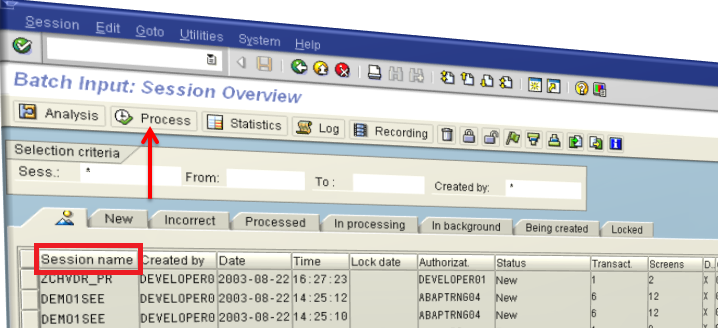
1) Go to SM35 ---> Choose session ---> hit process.
     Now See Question no. 10.
2) Use program RSBDCSUB.
     RSBDCSUB schedules the session to be processed in background.


Let's take an example to understand this.

The sessions are created at one point of time and processed at other point of time and this may create a problem: For example: a BDC program creates a session for updating 1500 customers in SAP. However , before this session is processed via SM35 , a user inserts 100 customers in the system manually. In this case , the session will have at least 100 errors when the session is processed from SM35.

One way to avoid this is to use the program "RSBDCSUB" in the batch input program itself so that the session is processed as soon as it is created.
RSBDCSUB schedules the session to be processed in background.

Question 6: What is the structure of the BDC table?The BDCDATA consists of the following fields:
§  PROGRAM [CHAR 40] - Online program name.
§  DYNPRO [NUMC 4] - Screen number.
§  DYNBEGIN [CHAR 1] - Flag to indicate the start of a new screen.
§  FNAM [CHAR 132] - Field name of a screen field to be filled with data.
§  FVAL [CHAR 132] - The actual value to be filled into the specified screen field.

Sample Screenshot:
BDCDATA structure
BDCDATA table structure

Question 7: What is the difference between BDC_OKCODE and BDC_CURSOR?
BDC_OKCODE: is used for storing commands during the recording. like '/00' is the command for 'ENTER' Key.
BDC_CURSOR: contains the cursor position. it contians the field in which cursor will be.

Example code:
perform bdc_field       using 'BDC_CURSOR'
                                                'PROJ-PSPID'.
perform bdc_field       using 'BDC_OKCODE'
                                                '=BU'.

Question 8: What are the 3 methods that we use in sequence in a Batch input session method ?

1) BDC_OPEN_GROUP for opening the Batch Input Session
2) BDC_INSERT for inserting the transactional data into SAP
3) BDC_CLOSE_GROUP for closing the Batch Input Session

If there are n records , the BDC_INSERT method should be called n times.
BDC_OPEN_GROUP and BDC_CLOSE_GROUP are called only once.

General Information about a session is stored in table APQI.

Transaction data for a session is stored in table APQD.

Question 9: What is your approach for writing a BDC program?
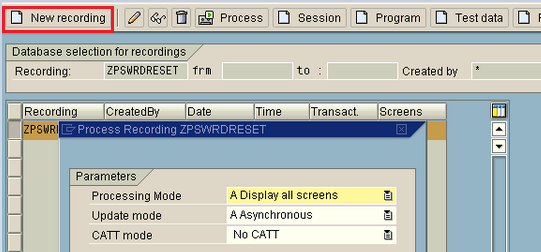
Identify the Tcode and do the recording in SHDB to populate the BDCDATA.

Once the recording is done , one can Transfer it to the Batch input program.


In the batch Input program , The transactional data is read from the file to an internal table.

Then one can loop over the transactional data in the internal table and start uploading the data in SAP either by CALL TRANSACTION method or by creating sessions through the batch input program.

Question 10: How do you process errors in Session method ?
You can go to Transaction SM35 , Choose the session name and click on Process.
Question 11: What are the different modes of processing batch input sessions?  


The three modes are:
Foreground
Display Errors Only
Background

Question 12: What is the difference between Synchronous and Asynchronous Update ?
In Synchronous update , the database is updated before the next transaction is taken for processing in a batch input.
In Asynchronous update , the system doesn't wait for updating the database before the next transaction is taken for processing in a batch input.


Question 13: What is the transaction for Recording BDC ?
The Tcode is SHDB.

Question 14: How do you read files from the Application server ?
You can use the commands:
OPEN DATASET ---> opens the file(dataset) either in read /write mode.
READ DATASET ---> Read the file
CLOSE DATASET ---> Close the dataset once the date has been read .

Question 15: How do you read files from the presentation server ?
You can use the Function Modules :
GUI_UPLOAD --> To read data from file into an internal table
GUI_DOWNLOAD --> To write data from internal table to a file on presentation server

If you found the post helpful , consider hitting the Google plus button------> 

Thanks and all the best for your interview :).