Saturday, January 5, 2013

SAP Certification Exam Structure

Find out why do you need SAP Certification, New SAP Exam structure, Levels of certification and all you need to know about SAP Certification


WHY SHOULD ONE GET CERTIFIED
Certification benefits for the SAP professional include:
  • Execute your job with improved levels of success and confidence.
  • Offer evidence of your experience and expertise with rigorous testing.
  • Create and provide access to a community of SAP professional-level certified peers.
WHICH CERTIFICATION EXAM SHOULD I APPEAR?
SAP Certification is divided into three levels based on your experience and depth of the knowledge.
SAP Tiered Certification
Associate level ( 1-3 years of experience )
This certification covers the foundational-level knowledge in an SAP solution. At this level the exam is based mainly on training, but hands-on experience reinforces the knowledge gained from training.
Professional certification ( 3-7 years of experience )
This advanced certification requires proven project experience, business process knowledge, and a more detailed understanding of SAP solutions.
Master certification (under development) ( 7-10 years of experience)
This certification, under development, involves demonstrating an expert-level understanding of a specific area of SAP software and the ability to drive innovation and solution optimization through in-depth knowledge and vision. Certification at this level requires broad project experience, comprehensive
SAP product knowledge, and the ability to create a future IT vision within complex project environments.
SAP CERTIFICATION EXAM STRUCTURE
Before you can understand the exam structure for the associate-, professional-,or master-level exam, you must understand the concept of a competency level.
Competency Level
Each level of the certification exam is comprised of two or more of the following competency levels:
  • Level A
Articulate, explain, describe, and outline solutions and processes.
  • Level B
Build, implement, configure, model, and troubleshoot solutions and processes.
  • Level C
Conceptualize, blueprint, modify, and optimize integrated solutions and processes.
Each question on the exam will belong to one of these competency levels. The percentages representing the number of questions for each competency level covered by the exam will vary by competency level.
The breakdown for the associate- and professional-level exams is shown below and illustrates how the percentages for each competency level will vary by exam level.
Competency
Level
Associate-
Level
Percentage
Professional-
Level
Percentage
Articulate, explain, describe, and outline solutions and processesA6020
Build, implement, configure,
model, and troubleshoot
solutions and processes
B4040
Conceptualize, blueprint,
modify, and optimize integrated solutions and processes
C040
GENERAL INFORMATION ABOUT THE EXAM
Duration of the Exam
You will have 3 hours (180 minutes) to take the exam. This is more than enough time to finish the exam.
About the Questions
The exam will have 80 questions. These questions have a structure just as the exam has a structure
ABOUT THE ANSWERS
Answers can be in five forms:
  • Multiple response
More than one answer will be correct. If you are presented with this type of answer, you must Identify all correct responses.
  • Multiple choice
Multiple choices (usually four) are provided, and only one answer will be correct.
  • True/false
Only one answer will be true or false.
  • Fill in the blank
The test is online, so you won’t actually be filling in the blank. This answer type will have you fill in the blank in the form of a multiple-choice answer. Only one answer will be correct.
  • Sequence/ranking
This is not used on the actual exam but could be on future exams. This answer type will have you rank or sequence answers in the correct order.

Friday, January 4, 2013

Get Free Access to SAP IDES system

You have loads of SAP Materials but do you still struggle to understand the concepts because you don’t get a chance to do Hands On. Your collegues suggested you to install a SAP system in your local machine which would hit your pocket and your local system resources. Grab your key to SAP IDES system in two simple steps.


Get your access to SAP IDES system in 2 simple steps.
1. Request a User Account
Once you fill in all necessary details and execute. You will recieve a mail regarding your login credentials.

2. Login using SAP WAS.
For logging you have two options
  • Using Internet BrowserHere you need not install anything on your end and you can login from any system which has a internet connection. Only setback is that all the screen are rendered as html pages which usually gives you a slower browsing experience.
  • Using SAP GUI :Here you need to install SAP GUI in your local system create a item for logging. This will give a better looks and the response is also comapratively faster.  If you have a S-USER ID you can download it from the following link  for Windows.
If you don’t have a S-USER ID then you can use the following link.
Use the following details for creating a new item in your SAP GUI.
Application Server: i62external
SAProuter-String: /H/ides.consolut.eu/W/consolut/H/
System-ID: I62
System Number: 09

If  you are not satisfied with the free server , we also provide premium access to SAP Server .

Follow the below link to know more information :-
http://sapconsultancy.blogspot.in/2012/10/sap-onlineremote-access-at-most.html

What is SAP HANA ?


In this article we will look at SAP HANA which is the most talked about product of SAP after its realased to customers on Dec 2010.
SAP’s High-Performance Analytic Appliance(HANA) exploits the advantages of In-Memory Computing that allows the processing of massive quantities of real time data in the main memory of the server to provide immediate results from analyses and transactions by combining SAP software components optimized on hardware provided and delivered by SAP leading hardware partners.
Reminds me of movie “3 Idiots” . Perfect definition to score 10/10 in any exam or interview. :)
Lets make it a little simple.
SAP HANA is a combination of hardware and software specifically made to process massive real time data using In-Memory computing
We managed to get a sneak peak of HANA hardware in Teched 10 at Bangalore.
SAP-HANA

Need of SAP HANA:

Quoting  Vishal Sikka “ If a business asks a question and gets the answer after 3 days probably one would even forget what was the question was after 3 days. “
So one of the key challenges IT is facing now is not only the capability to extract reports on huge amount of real time data which keeps growing in a exponential rate and from different sources but also analyzing it in different perspectives, that too in seconds.
Most of the Official SAP presentation refers to a popular term in Finance “ TED Spread “ , for explaining it , which is a measure of credit risk for inter-banking lending.
12179_b
Aftermath of the Lehman bankruptcy, TED Spread hit a record spread of 465 basis points. That magnitude of spread indicated a virtual shut down in interbank lending. All financial organizations use the TED spread as an indication of easing or tightening credit markets.
It might be a little difficult to digest it in the first go and since I am not a Finance guy so probably you can Google around to find more about TED Spread.
Summarizing the whole thing in a single sentence would be that every organization needs to make better decisions faster not only on real time data but Real real time data which keeps growing in a exponential rate and from different sources almost instantly.
When I say real real Time Data for a retail shop perspective the POS (Point of sale) data would be available for analytics even before the customer leaves the retail store.

Motivation for Architecture of SAP HANA

Most of the chip maker companies have been focusing on building multiple core as there is limitation on increasing the Clock Speed as  the more is the Clock Speed the more heat it emits while processing which results in expensive ways to control the temperature. If you observe the last decade the Clock Speed has not made any impressive change.
2002                                                         2006                                                         2010

Chip
Cores/CPU -   1 Core                                      4 Cores                                                                 8 Cores
Clock Speed – 1.8 GHz                                   1.6- 3GHz                                                             2.26 GHz
Software has always been made for the Hardware which these Top chip makers design.
There is always a need to build Software which can fully exploit the capabilities of the Hardware design.
So let’s have a look on both hardware and software features one by one.

HARDWARE DESIGN:

Huge amount of data is divided into multiple sets which are then crunched separately by the Blades as shown below.
blades1
blades2
Pic : Data is divided into 4 blades with 2 standby blades
The Blades are composed of multiple CPU’s per blade and each CPU has multiple cores per CPU.
This means if you say for example 8 cores per CPU and 4 such CPU’s per blade. So mere 4 Blades will have 128 cores crunching data in parallel.

SOFTWARE DESIGN:

HANA stores data in Column wise for fast computing. The below diagram compares, how data is stored row wise and column wise.
software-hana
For example: If system wants to find aggregate of the second column i.e. 10+35+2+40+12.
In Row wise: The system has to jump memory address to collect subsequent values for aggregation.
That is data records are available as complete tuples in one read which makes accessing of few attributes expensive operation.
In Column wise: A single scan would fetch the results much faster.

HOW IT WORKS:

saphana
SAP HANA can be used without disturbing our current IT landscape. In the above diagram show that data in the database can be replicated near real time into HANA and can be used for reporting with a number of BI tools directly sitting on the top of the HANA.

Why do you need SAP HANA ?

This article talks about various factors which leads to birth of power full and real time computing appliance –> SAP HANA !!!


What is the need of SAP HANA?
95% people will say Dude its faster that’s why we need it.
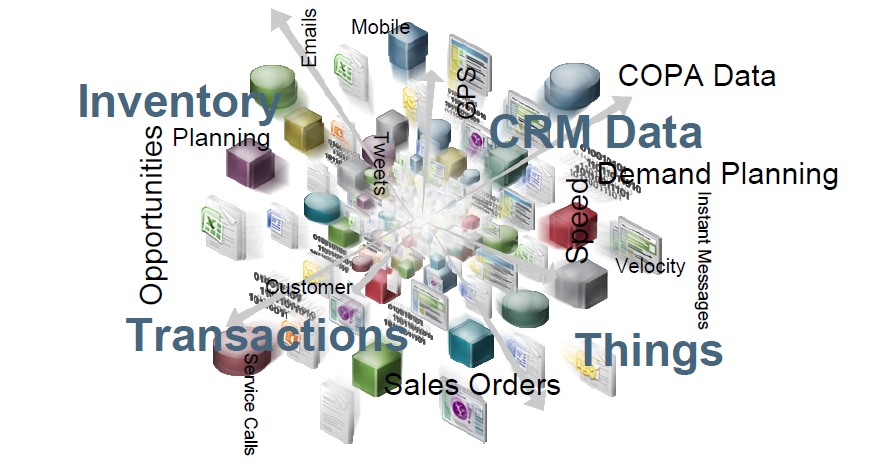
But it’s more than that. Let me tell you one real time example: currently there are three “V” any business solution needs to fight with: Volume, varieties and Velocity.
1.Volume ( Information Explosion )


Many years back when you had 1GB pen drive in your hand you were walking like a King!! But those golden days are gone now.
In an organization every year massive amounts of data is created and how fast your business reacts to important information determines whether you succeed or fail. This is a big problem and its getting bigger.
Few Facts about it :
  • IDC estimates that worldwide digital content added up to 487 billion gigabytes in 2009. They predict this will double in 18 months, and every 18 months thereafter.
  • In a Sloan Management survey in 2010 60% of executives said their companies have more data than they know how to use effectively. With data doubling every 18 months, that percentage is going to keep growing.
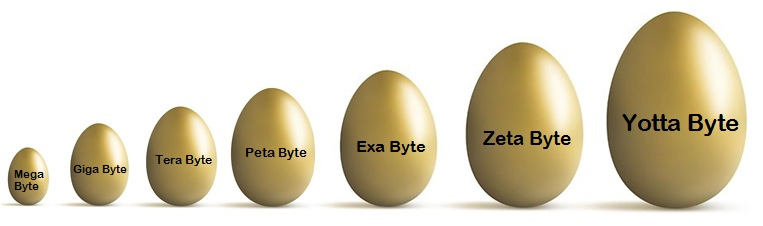
  • According to EMC, by the end of 2011 there was 1.8 Zeta byte of digital data.
And if you forgot the size units this “V” (Volume) will remind you that:
2.Varieties ( ‘Consumerization’ of IT )


Human is the most unsatisfied, indecisive and unpredictable animal. So the business application needs to be capable enough to handle these ‘Consumerizations’.
Customers expect business experience to be as satisfying as personal experience.
3. Velocity (Speed)
People want instant access to information – ‘in the moment’’ – whether that is a moment of risk or a moment of opportunity. If the moment has passed and your business has not taken the right action, it has failed. People want instant answers. They want them to be right. They want them anywhere, any time.
So to fight with these three “V”: Volume, Varieties and Velocity (A way to process and analyze massive amounts of data in real time.) SAP HANA is born!!!!!
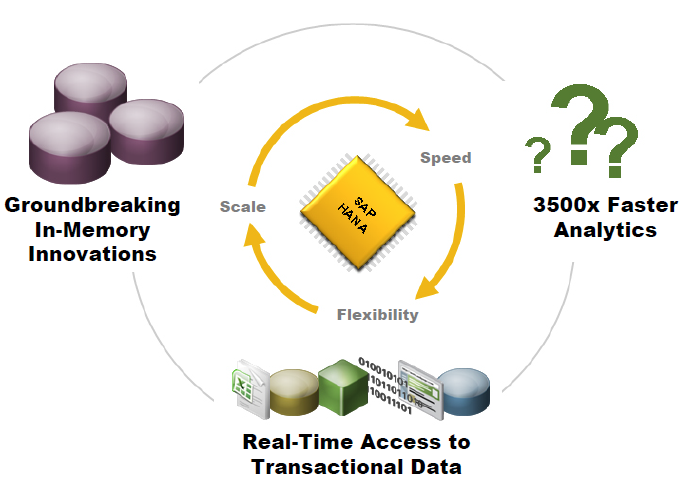
Below image explains the role of HANA.

That is the role of SAP HANA. Using groundbreaking in-memory hardware and software we can
manage data at massive scale, analyze it at amazing speed, and give the business not only instant access to real time transactional information and analysis but also more flexibility. Flexibility to analyze new types of data in different ways, without creating custom data warehouses and data marts. Even the flexibility to build new applications which were not possible before.

Design patterns in Object oriented programming


A pattern is a proven solution to a problem in a specific context.To explain you in simple words it’s like recipe of “grandma’s chicken soup “.After so many trails she found a perfect way , proper ingredients which makes a delicious Chicken soup.
So Other Hungry people can use the same recipe or I can say a proven solution to make a perfect Chicken soup.
In this article we will be discussing few most frequently used patterns In Object oriented programming like:
1).. Singleton Pattern
2).. Factory pattern family
3)..Facade pattern
4)..Proxy pattern
Let’s Talk about each one by one :

1…Singleton Pattern:

Yes you read it right. There can be only one!!!!
To explain you Singleton pattern let me take an example : Let’s say you are developing an application with model view controller framework .in this case The controller is a central part which will be handling everything.
Like: Calling a proper screen, informing model to fetch the data , navigation between two screens etc..etc…
So there should not be another instance of a controller class exist though out the application.
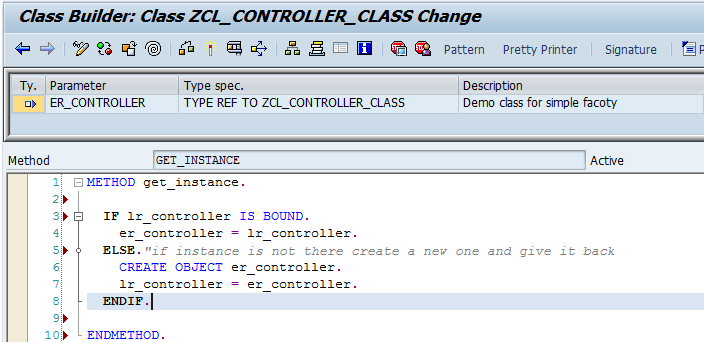
So how you can manage to do that?? I mean if you have class anyone can create an object of that class. The simple solution is making a constructor private!!!! (Now who dares to create an object of me ;-) )
So how do I get the instance in my code??
Here comes Factory patterns into picture …

2..Factory pattern family

Factory pattern family has 4 members (4 ways you can achieve the instance of a class (Singleton class))
Simple factory Method: Encapsulates object creation in a static method.
A static method in class which creates an object and returns the instance of a class!!
So instead of creating an object you will call this method which gives you the instance of controller class.

Simple factory: Encapsulates object creation in a separate class (not necessarily static!).
Use this pattern when you want object creation is handled by central class.so for the same model view controller your required objects will be provided by static methods of factory class.
Use: you can use this pattern whenever you have many single ton classes and you want a single factory class holds all the objects which are present during execution.
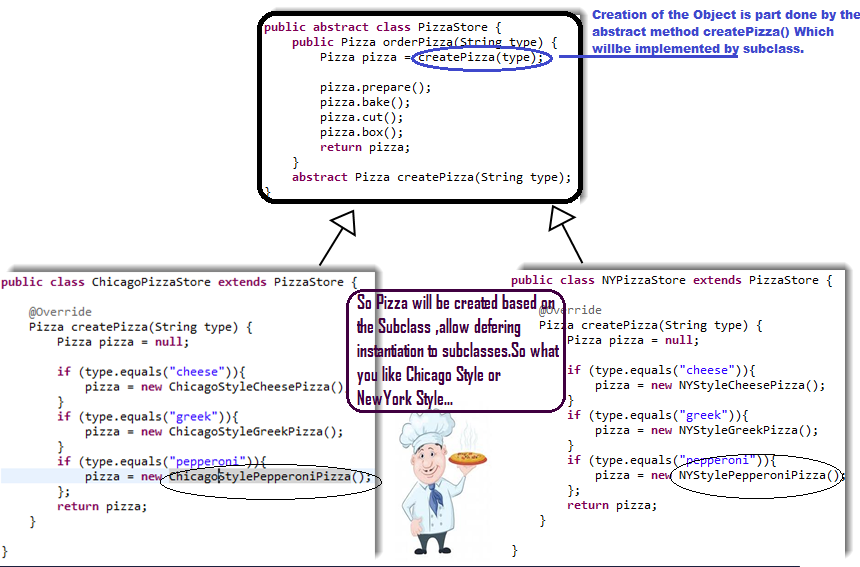
Factory method: Defines an interface for creating an object, but lets subclasses decide which class to instantiate. It lets a class defer instantiation to subclasses.


Uses : Handle object creation , Can be parameterized ,Can deny object creation when conditions are not met , Can keep track of objects.
Abstract Factory provides an interface for creating families of related or dependent objects without specifying their concrete classes.

3..Facade pattern

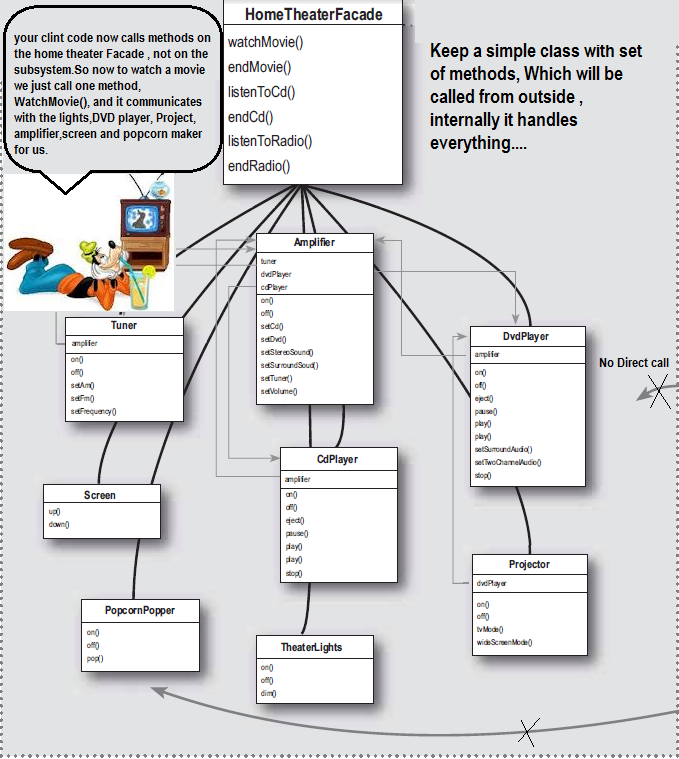
I love this pattern, it’s like make the coding look as simple as possible for outside world.

Keep a simple class with set of methods in front.
Our favorite Google is another example of facade. Its look so simple in front but that single page made it to the world’s most accessed site for searching ( Unless you don’t use it for checking internet connection !!! )

4..Proxy pattern:

Let’s say you are working in SAP system and you want to use certain methods of a class which your friend has developed in java system. How can you use it ??
Did it ring your bells (Web Service proxy???)
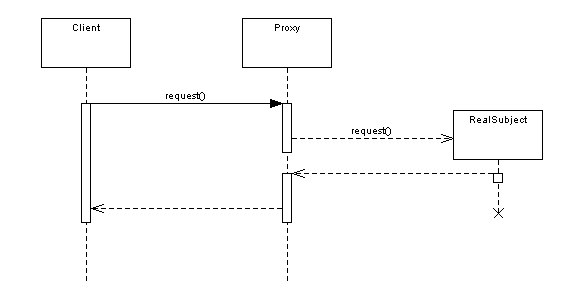
Ya calling a Web service using proxy pattern is the same stuff I am talking about. In sequence diagram this is how it will look like:
Client does not know anything about realSubect (JAVA method) .Proxy handles that part of calling Request () method in java system and authorization part .Proxy is part of SAP system here.
Huh…Tired??? Let’s discuss other patterns like: Observer , Strategy, Template Method , Interceptor which are famous outside non-Object oriented programming in another article.

Monday, December 31, 2012

Certified Material on Sale : SAP Workflow

Hi,

Offering SAP Certified Material on discounted rate.

SAP Workflow

BIT600 - SAP Workflow Concepts, Inboxes, Reporting, and Using Standard Templates
BIT601 - SAP Workflow Definition and Use of Customer-Specific Workflows
BIT603 - Workflow and Web
BIT610 - SAP Workflow Programming
BIT611 - SAP Business Workflow - Advanced Programming with ABAP OO

All the above five books are included in the Workflow Package.

Please mail me getting this Hot Deal !!!!

erp.solutions01@gmail.com


Sunday, November 4, 2012

Abstract Class vs Interface – Which to use when?


Basics

Before jumping to the differences, lets check out the basics of both – Abstract Class and Interface.

What is an Abstract Class?

Abstract Class is a special kind of class which can’t be instantiated. We can only instantiate the subclasses of the Abstract class if they are not abstract. Abstract class should at least contain one abstract method. Abstract methods are methods without any implementation – only a declaration. We can certainly define the variables referencing to Abstract class and instantiate with specific subclass at runtime.

ABAP Syntax Highlighter

 
*
CLASS zcl_base_functions DEFINITION ABSTRACT.
  PUBLIC SECTION.
    METHODS: set_my_name ABSTRACT IMPORTING iv_text TYPE STRING .
    METHODS: write_name.
  PRIVATE SECTION.
    DATA: my_name TYPE STRING.
ENDCLASS.                    "zcl_base_functions DEFINITION
*
CLASS zcl_base_functions IMPLEMENTATION.
  METHOD write_name.
  ENDMETHOD.                    "write_name
ENDCLASS.                    "zcl_base_functions IMPLEMENTATION
 

What is an Interface?

An interface is not a class. It is an entity which can’t have implementation. An interface can only contain empty method declaration and components. Interface components are always public. We can later change the visibility of the components within the implementing class using the ALIASES.

ABAP Syntax Highlighter

 
INTERFACE zif_order.
  METHODS: set_order_data IMPORTING iv_order_Data TYPE STRING.
  METHODS: create_order.
ENDINTERFACE.
*
CLASS zcl_sales_order DEFINITION.
  PUBLIC SECTION.
    INTERFACES: zif_order.
ENDCLASS.
 

Differences

Since both abstract class and interface are different entity, they have few differences:
Advertisement
  • Multiple Inheritance:We can achieve multiple inheritance using Interfaces. Since ABAP doesn’t support more than one Super class, we can have only one abstract class as Super class.
  • New Functionality:If we add a new method in the Interface, all the implementing classes have to implement this method. If we don’t implement the method, it would result into Run-time error. For Abstract class, if we add a non-abstract method, its not required to redefine that in each and every inherited class.
  • Default Behavior:We can have a default behavior of a non-abstract method in abstract class. We can’t have any implementation in Interface as it only contains the empty stub.
  • Visibility:All interface components are PUBLIC by default. For Abstract class, we can set the visibility of each component.

Recommendations

Based on the above mentioned differences, we can come to this recommendations:
  • If want to have multiple inheritance, you need to use Interface. As we can have more than one interface in the class definition, we can achieve multiple inheritance.
  • If wish to create multiple flavors of the object with some default operations, you should consider creating abstract class. As it provides you the flexibility to add the default operations directly to base class and all the subclass would get the new default operation.
  • If you want to provide common, implemented functionality among all implementations of your component, use an abstract class. Abstract classes allow you to partially implement your class, whereas interfaces contain no implementation for any members.
  • Interface should be used when working for a wide range of objects as interfaces only contain the stub, which enforces no default behavior. Abstract class should be used for classes which are closely related to each other.
  • We should use Interfaces for small functionalities which can be clubbed together to derived the concrete business object.
  • Interfaces, in contrary to abstract class, gain interface functionality no matter which hierachy tree they lie. So interface become common point to hierarchies which can’t normally seat one next to another. Futhermore if they require common implementation, a helper class can be utilized here. Thanks to Marcin.

FAQ's : SAP Server Access and Installation For Individuals


How SAP Server Access works? 
Q: How does the Remote SAP Access work?
Access to our SAP Online Training systems is via the internet - all you need is the SAP GUI version 7.1 or higher. If you don't have a GUI we will send you a download link from which you can download & install the SAP GUI. Our system offers you access to all user and configuration transactions for all modules (except for user maintenance and basis/system administration functions). You can play & practice as much as you want, including setting up your own entities, configuration, master data and transactions. Once you buy your SAP Server Access and Installation package it typically takes less than 1 business day to activate your account and you will receive an email with your user ID and password.
Q: How quickly do I get my user ID and password?
After you buy your SAP Access package it typically takes just a few hours to activate your account. We will send you an email with your user ID and password.

Q: What kind of internet connection do I need?
We recommend a high speed connection via DSL or Cable. If you have any Net Connector or dial-up connection you can still connect to the SAP systems but it will be very slow.

Q: Is the system available 24/7?
Yes, it is! However, we take the systems down on the first Saturday of each month for routine maintenance and back-ups. This downtime typically last for about 8 hours. Like everyone else we are not immune to technical glitches and have to work through issues which may take extended periods of downtime. In these rare cases we will offer either a refund (full or partial) or free access time.

Q: How fast are the systems? How many people are on it?
We have a dedicated T1 line and have users from all over the world! Connection speed has never been an issue for our students. Also, we keep the number of users per server to a minimum and typically have an average of only 20 users online!

Q: How often do you refresh the systems?
We typically refresh our systems every 6 months. That means your data will be available for a long time and you don't have to worry about re-doing all your work every 30 days as with the other providers that run illegal demo versions of SAP.

Q: Can I switch between systems?
Yes, you can. We can switch your subscription from one system to another free of charge once every month.

Q: Do I have access to all transactions & modules?
You have access to all user and configuration transactions for all functional modules, incl. FI/CO, MM, SD, HR, etc. However, we do restrict access to certain user maintenance and basis/system administration transactions to ensure a reliable environment for all SAP users.

Q: What about access to System Administration and other Basis functions?
Sorry, but in order to ensure a stable and reliable system for all users we restrict access to system administration and other Basis functions.

Q: Do you have IDES installed?
Yes, we do! The IDES (International Demo and Education System) provides a fully functional SAP Server Access and Installation system, including full configuration, master data and transactions. You can see how SAP configured the system and learn from their set-up. Also, the IDES data includes master records and transactions in all modules which means you don't have to do any set up yourself and can start learning right away!

Q: Do you offer multi-user or long-term discounts?
Yes, we do! If you have 5 or more users we will extend a 10% volume discount. Also, if you sign up for SAP access for 3 months or 1 year we will extend a discount ranging from 20-25%.

Q: Do you offer any support?
Absolutely! We offer email support 7 days a week via our online help desk system! Also, you can call us during regular business hours if you prefer to speak with us over the phone. We respond & resolve most issues within 1-3 business day. We support only technical server related issues such as system access , security ,user maintenance ,backup, patches, kernel update ,data restore, performance monitor and We do not, support pre-configuration, functional modules issue,functional additional knowledge,abap dump due to functional lack of knowledge.

Q: What if it just doesn't work for me after I buy access?
We want you to be 100% satisfied with your SAP Server Access and Installation! If you don't like our service tell us and we'll give complete support , at last we will give refund by reducing working days.

Q: Can you offer online training?
Yes, we provide SAP and other trainings online.
SELECT SAP SERVER
SAP ECC EHP5 IDES
SAP CRM 7.0 EHP1 IDES
SAP BI 7.0 IDES
SAP ECC 6.0 IDES
SAP HANA 1.X with BO 4.0
SAP GRC 5.3
Product Description
System Name
Available Modules
SAP ECC 6.0 EHP5
FI, CO, HR, SD, MM, PM, PP, QM, CS, CM, Global Trade Managment, Supply Chain Managment, Strategic Enterprise Managment, Invesetment Managment, Project System, Incentive and Commission Managment, Real Estate Managment, Public Sector Managment, Bank Applications: BP, Bank Cusmer Accounts, Loans Managment, Collateral Managment, SEM Banking, Reserve for Bad Debts, etc.,
SAP BI7.01
SAP BI - Advanced Enterprise Data Warehousing & Reporting and SAP Net Weaver, SAP BI - Enterprise Data Warehousing, BI - Reporting & Query Design and Business Planning with SAP NetWeaver BI. BEx analyzer and Designer.
SAP BI 7.01 and ECC6
SAP BI 7.1 and All SAP ECC 6 Modules.
SAP CRM 7.0
Web UI, Master Data, Marketing, Sales, Service, Interaction Center, E-Commerce, Partner Channel Managment, Industries: Entitlement Managment, Channel Sales, Leasing, Intellectual Property Managment Integration with ECC6.
SAP CRM 7.0 with ECC 6.0
SAP CRM 7.0 (Including Web UI) and SAP ECC 6.0.
SAP 
SAP ECC 6.0 (All Modules) 
SAP Remote Access @ sapathome
To make outgoing SAP Online Training more available than ever, ERP Training and Consulting has supplemented its already world-classes training with availability of online SAP access. We've designed this to provide all levels of users with the hands-on access they need to better do their jobs. You can conveniently access the SAP environment from the comfort of your home at your own schedule, 24 hours a day and 365 days a year.
SAP IDES Access
SAP IDES (Internet Demo and Educational System) are fully functional regular SAP Systems that come pre-configured by SAP to show how ideal implementations should look like. SAP has IDES developed for a lot of its products, e.g. APO IDES, CRM IDES, BW IDES, etc.

Above all, IDES shows you the possibilities of the integrated applications in the SAP System. IDES cover all aspects of a business enterprise, including Human Resources, Financial Accounting, Product Cost Planning, Overhead Management, Profitability Analysis, Planning, Sales and Distribution, Materials Management, Production, and much, much more. IDES have also integrated document administration and third-party CAD systems within the IDES system. This means that you can call up and display external documents, or access CAD drawings. SAP IDES is a normal SAP software but with lots of DEMO data. SAP IDES รข€“ the "Internet Demonstration and Educational System" in the SAP System, represents a model company. It consists of an international group with subsidiaries in several countries. IDES contains application data for various business scenarios that can be run in the SAP System.