Showing posts with label ABAP Interview Questions. Show all posts

Saturday, January 5, 2013

Implicit Enhancement in SAP ABAP ( New Enhancement Framework ) with Tutorial


Introduction: Implicit enhancement is an enhancement option which is provided in new enhancement framework .
Requirement is to remove Reconstruct tab from WPDTC Transaction.:
step1
There is something called transaction variant and screen variant .to solve this problem .But it has it’s own disadvantages like You can’t submit that Report using SUBMIT statement as it will not consider the changes done on screen using the variant.
Step 1:
Go to system status of transaction WPDTC and check the program name it is PDTC_REPORT.
Here you can see many Explicit enhancement (Source code plug-ins options).
step2
To hide a screen element code can be done in AT SELECTION-SCREEN OUTPUT event.
There is a form named  pdtc_screen_output.
step3
Step 2:
To see the Explicit enhancement option click on the spiral symbol on the top.
As we don’t have any explicit enhancement options the only possibility left is implicit enhancement.
To see the implicit Enhancement Go to menu path:
EDIT->Enhancement operations->Show implicit Enhancement Points.
As you know implicit enhancement options are provided at beginning and end of every method, function module and in subroutine.
step4
Select the Enhancement mode as CODE.
step4_1
The next pop up will show u the available Enhancement done in this Report, You can merge your enhancement in one of the available Enhancement or you can create your own. To create a new one click on the create icon.
Step 3:
Provide the Enhancement Implementation name and short text to it.
(Note: No need for composite enhancement implementation).
Click on the continue. It will again take you to the Select Enhancement popup. Select your created enhancement and continue.
step5
Step 4:
Now you can see some space in standard code to put your own code.
step6
As per the requirement we need to de-activate the last tab.
Go to layout of the screen 1000, and find the name of the third tab. To make your work easy the third tab name is : TABSTR_4.
Here is the simple code which can loop at the screen and deactivate the third tab.
loop at screen.
if screen-name = ‘TABSTR_4′.
screen-active = 0.
MODIFY SCREEN.
endif.
ENDLOOP.
Put the above code inside the Enhancement and activate it.
step7
Step 5:
Go to Transaction WPDTC and check that the third tab is invisible or not. ( if not don’t look puzzled just check whether you have followed the steps properly or not ).
step_final

SAP’s New Enhancement and Switch FrameWork


Get bored of using Old Customer Exits, User Exits ?????
Here comes The New Enhancement Framework to make it Easy for you to do customization in Standard SAP Applications.
grapgh
This New Enhancement frame work provides all new enhancement technologies such as new business add-ins ( BAdIs ) and source code plug-ins.

Kernel BADIs
New BADIs are also Known as Kernel BADIs , These BADIs are object-oriented enhancement options (or plug-ins). These BAdIs are based on interfaces that may be implemented by classes that may then be transported.
You can see Kernel BADIs from the transaction code Se18:
(Note :Technically badis are link with the Enhancment Spot) check the Below screen shot for more details.
im1
Source code plug-ins
In Source code plug-ins we have many options like Explicit Enhancement and Implicit Enhancement Developers (both SAP and non-SAP) may provide special hooks or portions in their code where enhancements may be applied. These are known as explicit enhancement options, and are mostly created by SAP at specific points of standard programs.
Explicit Enhancement:
In simple word explicit enhancement is provided by SAP, It is predefined location or plugs where you can put your code and enhance the standard. To see the explicit enhacement options in the object it requires to click on the spiral button which is given in the top tool bar.
im2
Supported Enhancement Technologies
The Enhancement Framework supports a number of different enhancement technologies, including:
• Class Enhancements. Class enhancement lets you add new methods to a class. Moreover, you may also
add optional parameters to existing methods.
• Function Group Enhancements. You may add new parameters to a function module via function group
enhancements.
• Source Code Enhancements. These may be enhancement points in the source code where source
code plug-ins may be attached. These plug-ins contain the code that enhances the given program, and
are treated as an addition to the original code of the program in question. On the other hand, the code
with the enhancement section may be substituted with the source code plug-in code used.
This plug-ins in the source code is called as Enhancement SPOTS.
SPOTS can be categorised in :
  1. Enhancement POINTS
  2. Enhancement SECTION
In simple words When you want to add your extra logic over the existing one use POINTS while when you want to replace the existing one use SECTION. When a SPOT is static it is used for data declaration while Dynamic SPOTS are used for coding.
Enhancement POINTS and SECTION are looks like as mentioned Below:
ENHANCEMENT-POINT <name> SPOTS <spot1> [<spot2>] [STATIC] …
ENHANCEMENT-SECTION <name> SPOTS <spot1> [<spot2>] [STATIC]
END-ENHANCEMENT-SECTION.
Implicit Enhancement:
In last if nothing works , like you don’t have any Explicit enhancement or you don’t have any BADIs, Do implicit enhancement .
This is easiest enhancement you can ever find.
Implicit enhancement options are provided internally in the beginning and end of every subroutine , Function module and methods. Where you can put your own code. Check the article

Tutorial on Implicit Enhancement.
Switch Frame Work:
Each Enhancement package contains a set of business functions. Each “business function” are optionally implemented and activated. Switch frame work is something using which you can deactivate certain Business functionality depending on the client requirement. You can also assign switch to your implemented enhancements so if required you can de activate all of them in single go.

Working with A BADI which does not contain proper import data


How can you use a BADI which does not contain  desire import or export data ?
Many time such condition occurs  when you find a perfect BADI for your requirement but As the BADI does not contains proper import data you cant use it.
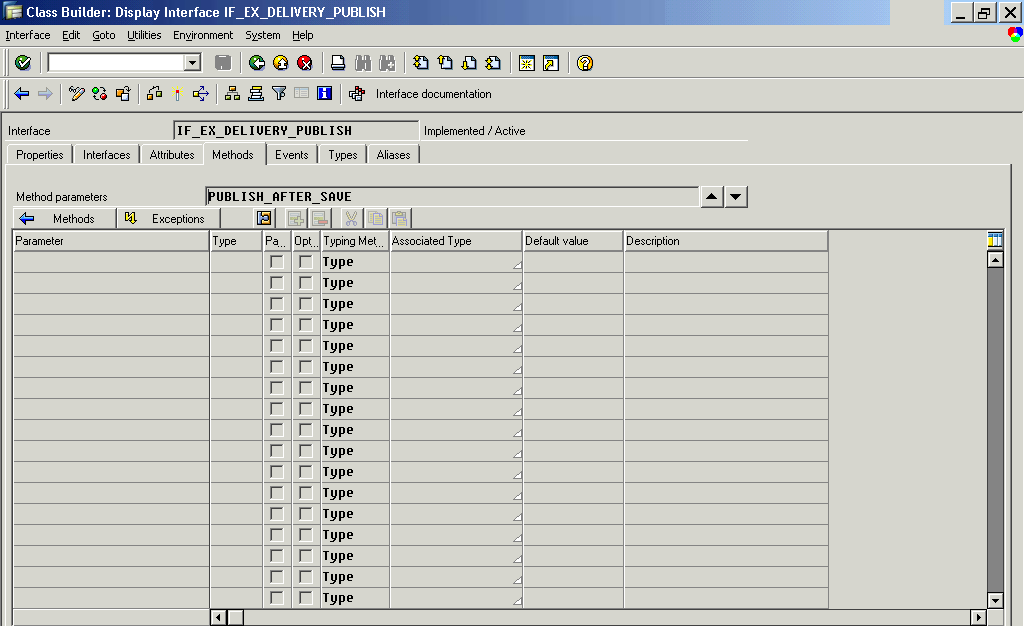
Lets take an example for BADI Delivery_publish.
This BADI gets trigger when you do the POST Goods issue.
Now this BADI does not contain any input parameter.So ideally it is of no use if you want to perform a particular task on that delivery,
So what can be done!!!!!!!!!!!!
SAP has given a unique solution for this kind of problem.
See the below code:::
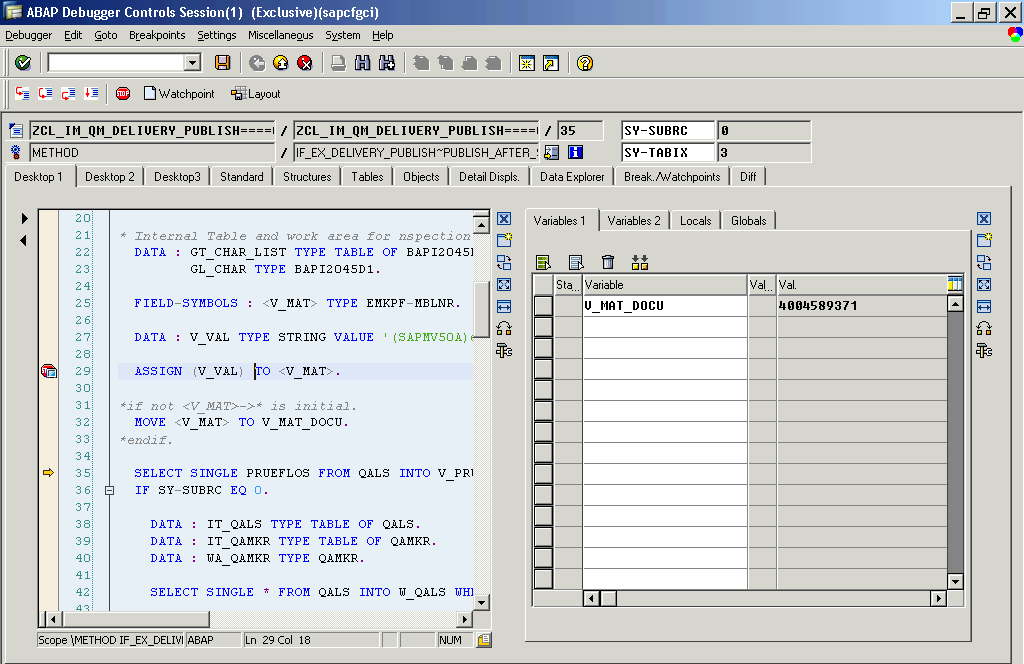
DATA : V_MAT_DOCU TYPE EMKPF-MBLNR.
FIELD-SYMBOLS : <V_MAT> TYPE EMKPF-MBLNR.
DATA : V_VAL TYPE STRING VALUE ‘(SAPMV50A)emkpf-MBLNR’.
ASSIGN (V_VAL) TO <V_MAT>.
MOVE <V_MAT> TO V_MAT_DOCU.

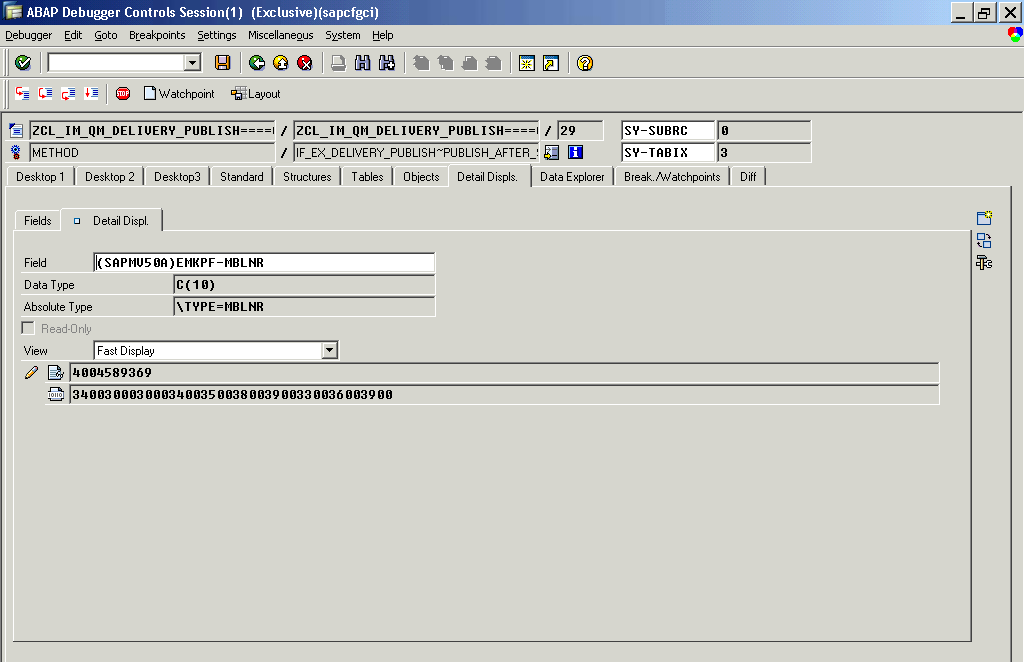
I can able to find the material Document No. Here..
Here we have use field symbols for reading a global variable EMKPF. Which is there in main program SAPMV50A.
(Note : It is not mandatory that you can access this program’s global variable only.You can access all the program’s global variable which are initialised in the current call sequence.
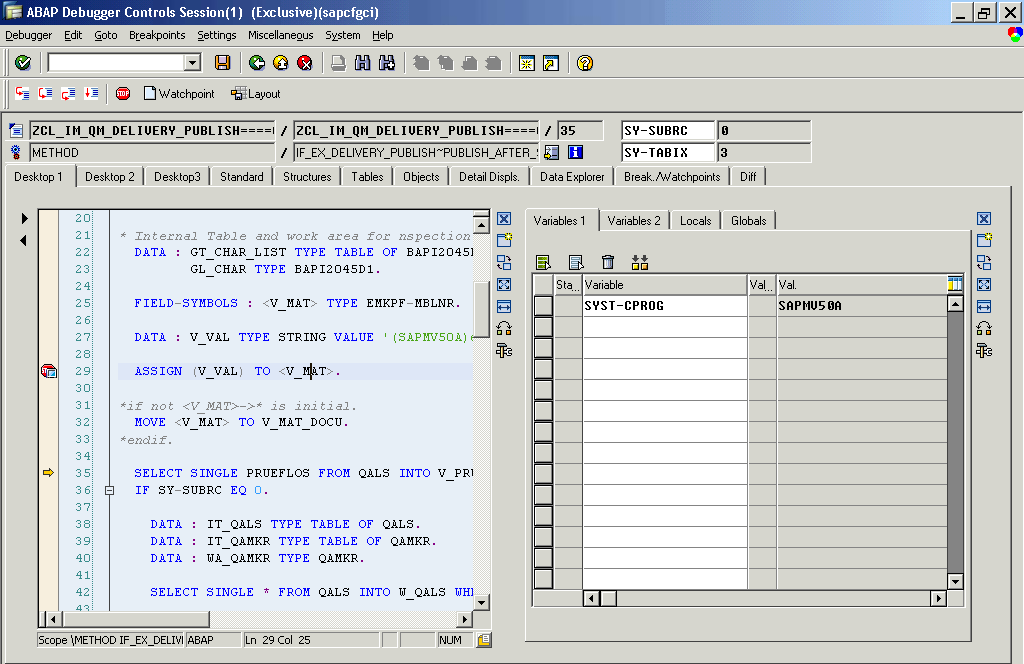
Note : if you don’t know the main program name you can find it from system table SYST and field CPROG.Now go to this program and check the top include where u will find the EMKPF table .So here is the guess that this variable might have the data initialize by Standard SAP before calling this BADI.u can see this variable in debugging mode by  (SAPMV50A)emkpf-MBLNR.
Note : Don’t ever change value As it may effect the standrad SAP codes.

Regular Expressions (Regex) and its use in ABAP

Supported as of Release 7.00 Regular Expressions (Regex) are rarely found in ABAP. Have you ever heard something about Regex? We believe so. This article will give you a brief overview and present very good articles from SDN.


Even in ABAP Regular Expressions (Regex) is not a new issue. ABAP supports regular expressions as of Release 7.00, released to customers on Oct 24, 2005. Although not so new its use is rarely found in ABAP. One of reasons is that SAP has already provided other ways to search for patterns e.g. SEARCH txt FOR pattern and IF txt CP pattern.
But what is Regex after all?
Wikipedia
“In computing, a regular expression, also referred to as regex or regexp, provides a concise and flexible means for matching strings of text, such as particular characters, words, or patterns of characters. A regular expression is written in a formal language that can be interpreted by a regular expression processor, a program that either serves as a parser generator or examines text and identifies parts that match the provided specification.”
There is a very good tutorial about Regex at http://www.regular-expressions.info. We will skip the basics of Regex and go directly to its use in ABAP.
Using Regex in ABAP
Regex is more powerful than traditional SAP patterns and is commonly used for searching and validating text. ABAP supports Regex in the statements FIND and REPLACE and via the the classes CL_ABAP_REGEX and CL_ABAP_MATCHER.  There is an excellent article at SDN produced by Shaira Madhu with many more details of Regex in ABAP.
Let’s see some examples.
Example 1 – Tests if text starts with Hello (case sensitive)
DATA text TYPE string.
DATA moff TYPE i.
DATA mlen TYPE i.
text = `Hello World example`.
FIND REGEX '^Hello' IN text MATCH OFFSET moff MATCH LENGTH mlen.
IF sy-subrc = 0.
WRITE / text+moff(mlen).
ENDIF.
Example 2 – Removes example from the text only if it is the last word
DATA text TYPE string.
text = `Hello World example`.
REPLACE REGEX 'example$' IN text WITH ''.
IF sy-subrc = 0.
WRITE / text.
ENDIF.
Example 3 – Validates e-mail using the class CL_ABAP_MATCHER
DATA email   TYPE string VALUE `webmaster@sapignite`. "missing .com
DATA matcher TYPE REF TO cl_abap_matcher.
matcher = cl_abap_matcher=>create(
pattern = `\w+(\.\w+)*@(\w+\.)+(\w{2,4})`
text    = email ).
IF matcher->match( ) IS INITIAL.
MESSAGE 'Invalid e-mail' TYPE 'I' DISPLAY LIKE 'E'.
ENDIF.
Tip: For testing Regex without coding you can use the ABAP program DEMO_REGEX_TOY.
DEMO_REGEX_TOY screenshot
ABAP Geek 14 – Regular Expressions Made Easy
http://www.sdn.sap.com/irj/scn/weblogs?blog=/pub/wlg/15768

Best practices working with SAP ABAP : DATABASE

Looking For best practices to follow while working with database in sap abap.check out this article.


Here are the few best practices you should follow to improve the performance while working with Database.
Buffering of Data (Useful but wrong Buffering can be harmful)
Defining a table as buffered (SE11) can help in improving the performance but this has to be used with caution.


  • Buffering of tables leads to data being read from the buffer rather than from table. Buffer sync with table happens periodically, only if something changes which is happen rarely.
  • If this table is a transaction table chances are that the data is changing for particular selection criteria, therefore application tables are usually not suited for table buffering.Using table buffering in such cases is not recommended.

    • Customizing data and Master Data should be buffered from DB to Application layer. This will help in reducing the number of hits to the database and enhance performance.
    • In case of Standard master data, try using already available standard Function Modules to fetch data with buffering.
    Following statements cannot be used with a buffered table. In such cases, buffer is bypassed. These are:
    - SELECT DISTINCT
    - ORDER BY
    - GROUP BY
    - HAVING
    - Nested Queries
    - JOIN Queries

    Indexing ( its kind of useful if you are not creating it just for name sake , But at the same time time-consuming if its created without proper research ) Creation of Index for improving performance should not be taken without thought. Index speeds up the performance but at the same time adds two overheads namely; memory and insert/append performance.
    When INDEX is created, memory is used up for storing the index and index sizes can be quite big on large transaction tables!
    When inserting new entry in the table, all the indexes are updated. More index more time. More the amount of data, bigger the indices, larger the time for updating all the indices
    Table should not have more than 2 secondary indexes if the data class is APPL1.
    Table should not have more than 4 secondary indexes if the data class is APPL0.
    A secondary index should not have more than 4 fields.
    Table should not have a unique secondary index.
    Use secondary index / Create secondary index if accessing a database table with non-key fields depending on the frequency of usage and volume of data accessed.


    JOIN Vs. FOR ALL ENTRIES
    JOINS are recommended to be used till 5 joins. If the JOIN is being made on fields which are key fields in both the tables, it reduced program overhead and increases performance.
    So, if the JOIN is between two tables where the JOINING KEYS are key fields JOIN is recommended over FOR ALL ENTRIES.
    Check that the internal table used in FOR ALL ENTRIES is NOT empty as this will retrieve all entries from the table


    HAVING clause in a SELECT statement
    In a SELECT statement, the HAVING clause allows you to specify a logical condition for the groups in a GROUP-BY clause.
    Effective use of the having clause can reduce the set of data transferred from the database to the application server.
    When the having clause is used, the aggregates and groups are constructed in the database instead of the application server, thereby reducing the resulting set.
    For example, if application requires cumulative sales figures for a month in APJ.
    Care needs to be taken while selecting a proper match ;-)
    SELECT *
    Wherever possible, fields should be specified rather than SELECT *.

    SELECT * Vs. SELECT SINGLE *
    If you are interested in exactly one row of a database table or view, use the SELECT SINGLE statement instead of a SELECT * statement.
    SELECT SINGLE requires one communication with the database system whereas SELECT * requires two.
    SELECT SINGLE Vs SELECT … UP TO 1 ROWS?
    SELECT SINGLE and SELECT UP TO n ROWS return the first matching row/rows for the given condition. It may not be unique, if there are more matching rows for the given condition.
    In order to check for the existence of a record then it is better to use SELECT SINGLE than using SELECT … UP TO 1 ROWS since it uses low memory and has better performance.With ORACLE database system, SELECT SINGLE is converted into SELECT … UP TO 1 ROWS, thus they are exactly the same in that case.
    The only difference is the ABAP syntax prevents from using ORDER BY with SELECT SINGLE, but it is allowed with SELECT … UP TO 1 ROWS.
    Thus, if several records may be returned and we want to get the highest record for example, SELECT SINGLE cannot be used, but SELECT … UP TO 1 ROWS WHERE … ORDER BY … may be used.
    Accessing Pool and Cluster Tables
    When accessing pool and cluster tables, these should be accessed using the full primary key

    SELECT query in a loop
    Avoid placing a ‘SELECT’ or ‘SELECT SINGLE’ in a loop to minimize the number of database requests

    SELECT.. INTO Vs. SELECT..INTO CORRESPONDING FIELDS OF..
    Use the latter if:
    the fields are needed in a different order the not all fields are needed and INTO does not work because gaps would appear.


    SELECT….INTO Vs. SELECT…ENDSELECT….APPEND
    It is more efficient to use the former to pull the data from DB to internal table rather than performing APPEND within SELECT…ENDSELECT.
    Bad Example:
    SELECT * FROM T006 INTO X006.
    APPEND X006.
    ENDSELECT.
    Good Example:
    SELECT * FROM T006 INTO TABLE X006.

    SELECT *…WHERE <Condition>
    The number of records retrieved should be limited using the ‘WHERE’ clause rather than selecting and using the ‘CHECK’ statement.
    Fields should be listed in the WHERE clause in the same order as they appear in the table.
    Bad Example:
    SELECT * FROM SBOOK.
    CHECK: SBOOK-CARRID = ‘LH’ AND SBOOK-CONNID = ’0400′.
    ENDSELECT.
    Good Example:
    SELECT * FROM SBOOK WHERE CARRID = ‘LH’ AND CONNID = ’0400′. ENDSELECT.


    ORDER BY clause Vs. Internal Table Sorting
    Using SORT statements in place of ORDER BY clause in SELECT statement is more efficient.
    Sorting will happen in Application layer on the internal table which will be much faster as compared to search in DB using ORDER BY clause.
    Perform ORDER BY clause should NOT be used with non-key and non-index fields.
    Do not use SORT statements within a loop.


    Aggregate Functions
    Make use of aggregate functions while writing Select Query rather than using loops on internal tables to find Max. Value for example as this is more efficient.

    Bad Example:
    C4A = ’000′.
    SELECT * FROM T100 WHERE SPRSL = ‘D’ AND ARBGB = ’00′.
    CHECK: T100-MSGNR > C4A.
    C4A = T100-MSGNR.
    ENDSELECT.
    Good Example:

    SELECT MAX( MSGNR ) FROM T100 INTO C4A WHERE SPRSL = ‘D’ AND ARBGB = ’00′.


    SELECT DISTINCT Vs. SELECT….SORT….DELETE ADJACENT….
    Avoid using SELECT DISTINCT clause. Instead SORT the internal table and then DELETE the adjacent duplicates as this is more efficient.

    Identical Selects
    Avoid using identical selects (SELECT with same parameters and WHERE clause) multiple times in a program flow. This causes hits to DB which can be reduced with biuffering
    Consider buffering of data from SELECT statement and re-using the same information elsewhere instead of querying the database again with same parameters.


    Existence Checks
    If you are interested if there exists at least one row of a database table or view with a certain condition, use the Select … Up To 1 Rows statement instead of a Select-Endselect-loop with an Exit.
    If all primary key fields are supplied in the Where condition you can even use Select Single. Select Single requires one communication with the database system, whereas Select-Endselect needs two.

    Monday, October 29, 2012

    SAP ABAP Interview Question (SAP Labs, Accenture, IBM , Deloitte , TCS , Infosys)


    After Observing many interviews. Finally i come up with the following questions which are mostly asked in all the Big companies including SAP Labs, Accenture, IBM , Deloitte , TCS , Infosys etc…
    1. Can we write the code both call transaction and session method in single program?
    Ans. Yes it is possible to write call transaction and session in one program.
    2. Which BDC you prefer?
    Ans. If we want to transfer large amount of data and when we need to use more than one transaction code we prefer session method. For small or less amount of data and for single transaction use call transaction.
    (This is more genric answer but you can add more on to this if you have worked on  BDC)
    3. When u prefer LSMW?
    Ans. When we need to update medium amount of data we use LSMW. LSMW is also used when the person like functional consultant has less programming language.
    5. Difference between .include and  .append?
    Ans.
    Include structure allows to add one or more structure into structure or table.Also placed positioning anywhere. Upto 6 include structure can be used in a table.
    Append structure can be placed only at the end of a structure or table which also stops further insertion of fields.Only one append structure can be used
    6. Preformance techniques
    Ans.
    1. The sequence of fields must be same as per database table
    2. During writing select query write all fields in sequence as per database table.
    3. Never write select statements inside loop….endloop.
    4. Use st05 SQL trace, se30 run time analysis, code inspector, slin,etc.
    5. Use select single * statement instead of select *
    6. Always use primary key
    7. Use binary search but before using binary search sort that table.
    7. How to debug sapscripts ?
    Ans.
    Two ways to debug sapscript . first way is goto SE 71 and from menu bar select Utilities->activate debugger .then goto SE38 execute the print program ,it automatically goes to debugging mode …..the other way is , run the program RSTXDBUG in se 38 . execute it . a message will show that debugger is activated .now open the print program in se 38 …u vll notice that the print prgm is automatically diverted to debugging mode.
    8. What is partner selection?
    Ans. This concept is mainly used in IDOC where u select the partner profile using Tcode We20 .with  Tcode SM59 you create RFC(remote function call) to create communication link to a remote system.
    10. What is occurs in internal table?
    Ans. Occurs addition to the Declaration will give initial size to that table.occur statement allocates 8kb of memory to the internal table.
    11. What is page window?
    Ans : page window is nothing but a container of a page ,which uniquely identifies a set of data …for example while creating invoice …we create logo window , billing document header window , customer window , terms and condition window etc …
    12. What is the difference between scrolling a table horizontally and vertically..??
    Ans: In table control when you scroll a table vertically presentation server needs to call application server to fetch the next record and display in the table while in case of horizontal scroll there is no need to call application server.
    13. What are Field Groups?
    Ans: A group that combines several fields fewer than one name, at runtime, the INSERT command is used to define which data fields are assigned to which field group are called Field Groups. It should always be a HEADER field group that defines how the extracted data will be sorted; the fields grouped under the HEADER field group sort the data.
    14. List the events in ABAP/4 Language?
    Ans: The events in ABAP/4 are load of program ,Initialization, Selection Screen, Start of Selection, End of Selection, Top of page, Line selection, User command, End, First.
    15.How the values will be passed to RFC Function module PassbyValue or Passbyreference?
    Ans: always Pass by Value.
    RFC is Remote Function call so it can’t access the values with Pass by reference.
    16. Buffering concept usage?
    Ans: There are three type of buffer
    1 single record
    2 generic buffer
    3 full buffer
    Buffering is use for improve performance. it improves performance  10 to 100 times more
    17. Select up to 1 row and select single difference ?
    Ans:  Select single fetches first matching record. If more than one matching records are there then only the first matching record will be considered other records will not be taken into account. Where as select up to 1 rows will fetch all the matching records from the database.(Again it will assign only One Record to the internal table/Work area)
    18. What are the different buffering methods?
    There are two different buffering methods
    The system ensures that data transfer between the R/3 System and the database system is as efficient as possible. To do this, it uses the following techniques:
    Table buffering: The program accesses data from the buffer of the application server.
    Database request buffering: Individual database entries are not read or passed to the database until required by an OPEN SQL statement.
    19. Different types of locks?
    v  Read lock (shared lock)
    Protects read access to an object. The read lock allows other transactions read access but not write access to the locked area of the table.
    v  o Write lock (exclusive lock)
    Protects write access to an object. The write lock allows other transactions neither read nor write access to the locked area of the table.
    v  o Enhanced write lock (exclusive lock without cumulation)
    Works like a write lock except that the enhanced write lock also protects from further accesses from the same transaction.
    20. CHAIN END CHAIN?
    Ans: Chain and end chain are used for multiple field validation in Module pool programming .It is written inside the screen flow logic.
    21.How to Debug RFC Function module?
    Ans:
    SE38 –> Utilities –> Settings –> ABAP Editor –> Debugging
    Activate the external debugging and choose the New Debugger option in ABAP debugger.
    Go to the particular place in the code and put break point, pop will appear then choose the HTTP break point.
    If you are triggering the RFC from SAP portal make sure that both the user ID should be same
    If the users are different then provide the XI/Portal User ID in the users field.
    22.Why sapscripts are client dependent and smartforms are client independent.?
    Ans-: Smartforms create its own function module so it doesn’t need to transport the request through SCC1.As all the Development Object are stored in client independent tables. Whereas Script doesn’t generate  any function module while executing so we need to transport the request number through SCC1.Sap script is stroed in side the client depended table as a TEXT.so sapscripts are client dependent and smartforms are client independent.
    23. Difference between user exit and BADIs?
    Ans: User exit is for single implementation and it is procedural approach while BADIs are for multiple implementation and object oriented approach.
    Multiple implementation means Reusability… because we use OOps Concepts for BADI.
    24. Control break events in ABAP:-
    1. AT-FIRST: This is used when we want to execute the statements before records are processed.
    2. AT-LAST: This event is used when we want to execute the statements after all records are processed.
    3. AT-NEW: This event is used when we want to execute the statement before group of records are processed.
    4. AT-END: This event is used when we want to execute the statements after processing of group of records.
    25.I am uploading 100 records out of which say 59th record has error so what will happen if i am using synchronous or asynchronous method of BDC? Can we update the database using local update mode how?
    26. Suppose i am writing following code then what will be output?
    LOAD-OF-PROGRAM.
    WRITE:/”HELLO”.
    Ans:  HELLO
    (Explain the importance of LOAD-OF-PROGRAM Event.If you dont know Tell the interviewer as this event is used in such cases when you want to clear sum buffers or something Before calling that Program)
    27. What is TMG?
    Ans. TMG stands for Table Maintenance generator. It is a tool available in abap by which we can add or delete multiple records at a time and it is executed or triggered by the transaction code SM30.
    28. Difference between select option and ranges ?
    Ans. The main difference between select option and ranges is that ranges implicitly or automatically creates internal table with fields like OPTION,LOW,HIGH,SIGN,etc . Where as in case of select option we have to explicitly create internal table.
    When u declares a select options it will implicitly declare an internal table (ranges) for you.
    While using RANGES syntax u can declare internal table explicitly.
    The only need of declaring ranges is when you r not taking input from the user but you want make limit based selection at that time it will be use full e.g. SELECT ** from ** where MATNR in val_range.
    here u can use select-option or ranges : val_range.
    29. is it possible to bring select option in module pool screens?
    Ans.Create a SELECT-OPTIONS in module pool screen using two methods as shown.
    Method 1:—-
    a) Create a subscreen area in your screen layout where you want to create the select options.
    b) In the top include of your module pool program declare a selection screen as a subscreen e.g.
    SELECTION-SCREEN BEGIN OF SCREEN 100 AS SUBSCREEN.
    select-options s_matnr for mara-matnr.
    SELECTION-SCREEN END OF SCREEN.
    c) In the PBO and PAI of the main screen where the select options needs to be created do a call subscreen of the above screen (100).
    CALL SUBCREEN sub_area INCLUDING <program> <screen>
    This CALL SUBSCREEN statement is necessary for transport of values between screen and program.
    Note: All validations of the selection screen fields e.g. the s_matnr field created above should be done in selection screen events like AT SELECTION-SCREEN etc and not in PAI. These selection screen validations etc should be done in the top include only.
    Method 2:——-
    a) Create 2 separate fields in your screen layout – one for the low value and one for the high value. Insert an icon beside the high value which will call the multiple selections popup screen on user command. Use function module COMPLEX_SELECTIONS_DIALOG to achieve this.
    continued ……
    struc_tab_and_field-fieldname = con_cust. ” ‘KUNNR’
    struc_tab_and_field-tablename = con_kna1. ” ‘KNA1′.
    CALL FUNCTION ‘COMPLEX_SELECTIONS_DIALOG’ EXPORTING*
    TITLE = ‘ ‘
    text = g_titl1 ” ‘Customers’
    tab_and_field = struc_tab_and_field
    TABLES RANGE = rng_kunnr
    EXCEPTIONS
    NO_RANGE_TAB = 1
    CANCELLED = 2
    INTERNAL_ERROR = 3
    INVALID_FIELDNAME = 4
    OTHERS = 5.
    IF NOT rng_kunnr[] IS INITIAL.
    * Read the very first entry of the range table and pass it to
    * dynpro screen field
    *READ TABLE rng_kunnr INDEX 1.
    IF sy-subrc = 0.
    g_cust = rng_kunnr-low.
    ENDIF.
    ENDIF.
    You can use the return table rng_kunnr to populate your own internal range table with the values entered by the user. Basically here you are just simulating the work of a select-options parameter by module pool screen elements.
    30.how we can retrive data using secondary index.explain with simple example
    Ans:  First create secondary indexes on required fields of a particular database table.
    We can create one primary index and 15 secondary indexes.Once the respective secondary indexes are created write select queries and within select queries specify secondary indexes field name with where clause.
    31.How can we handle table control in BDC?
    Ans.We can handle table control using line index
    Line index indicates which line of Table control is to be use for BDC transaction
    Ex -
    perform bdc_field using ‘RC29K-AUSKZ(01)’
    Indicates 1st line of table control is going to be used for transaction which is Line index of Table Control
    32. If i want to execute a BDC program only in background not in foreground is there any option for this?
    Ans.The sm37 transaction can be used for running a program in the background. Also in the session method while processing the session you can specify the processing type as background or foreground.
    33.How Can We upload a text file having Delimiters in to Legacy System
    Ans.For up loading text file we use the pre-defined FM gui_upload. in that FM we have the parameter has_field_seperator for that we assign the default delimiter ‘x’.
    HAS_FIELD_SEPERATOR ‘X’
    ‘X’ can provide the Whatever delimiter we used in flat file for separation.
    34. What is the land scape in sap.
    Ans. In every organisation sap landscape involves three servers viz, Development server, Quality server and Production server. Whatever new development we do as per clients requirement is done in development server. Later to test the developed object we move it to quality server for testing and finally once everything goes clear then the object is moved to production server ,production server data is ready for final business use.
    35. Workbench request are client dependent or client independent
    Ans. Workbench request are client independent.
    (Common Man Workbench request holds the Program , FM etc…. How it can be Client Dependent!!!!)
    36. Tell me about workbench request and customization requests.
    Ans.Workbench (ABAP Dev) request is client independent when you import it into one system it reflact it in all client in same system, but customized request has to import in that client perticular client where it is created, actually it is client dependent.
    Other  Interview questions…
    SAP SCRIPTS & FORMS
    1. Can we write the code/program inside sap script?
    2. How will u create sapscripts & smartforms in multiple language?
    3.How to execute sap script & smart forms in Background?
    4.How to do total & subtotal in scripts & forms?
    =================================================
    DATA DICTIONARY
    1.Apart from .include & .append how will u do table enhancement?
    2.what r the events of table maintainence generator?
    3.what will happen if i use projection view and maintainence view together?
    4. I created ZEMP table now i want to add more data but prev. data should not disturb how can i do this?
    =====================================================
    REPORTS
    1.How will u print footers in alv report?
    2.How will u edit fields from output list of alv?
    ====================================================
    BDC
    1.what r the fields u took during recording for mmo1,me21n?
    2.If u want to do bdc for xd01 explain me how will be the flow?
    =================================================
    user exits
    1.what r enhancement points?
    2.How to write customer exits?
    3.what is routine? how it is different from user exits?